
English
Connect the 115 cloud drive
Only 115 Cookie access is provided; WebDAV, Alist and other cloud drives are unsupported. The application reads directories and obtains playback direct links without downloading/caching media bodies.
Save credentials
Prepare valid credentials for a 115 account you are permitted to use, and check an available trial/purchased license under 应用授权. There is no 115 QR sign-in or automatic Cookie acquisition button.
- As the application administrator, open 设置 → 115 网盘 (Settings → 115 drive).
- Paste the complete Cookie, with at least
UIDandSEID, as semicolon-separated key/value pairs such asUID=…; SEID=…; …. - Click 保存凭据 (Save credentials). Success means local persistence, not acceptance by 115.
- Open 云端目录 → 打开我的网盘 (Cloud folders → Open my drive). Seeing your actual folders establishes that this request worked. For invalid/expired credentials, unavailable licensing or upstream limits, follow the actual error.
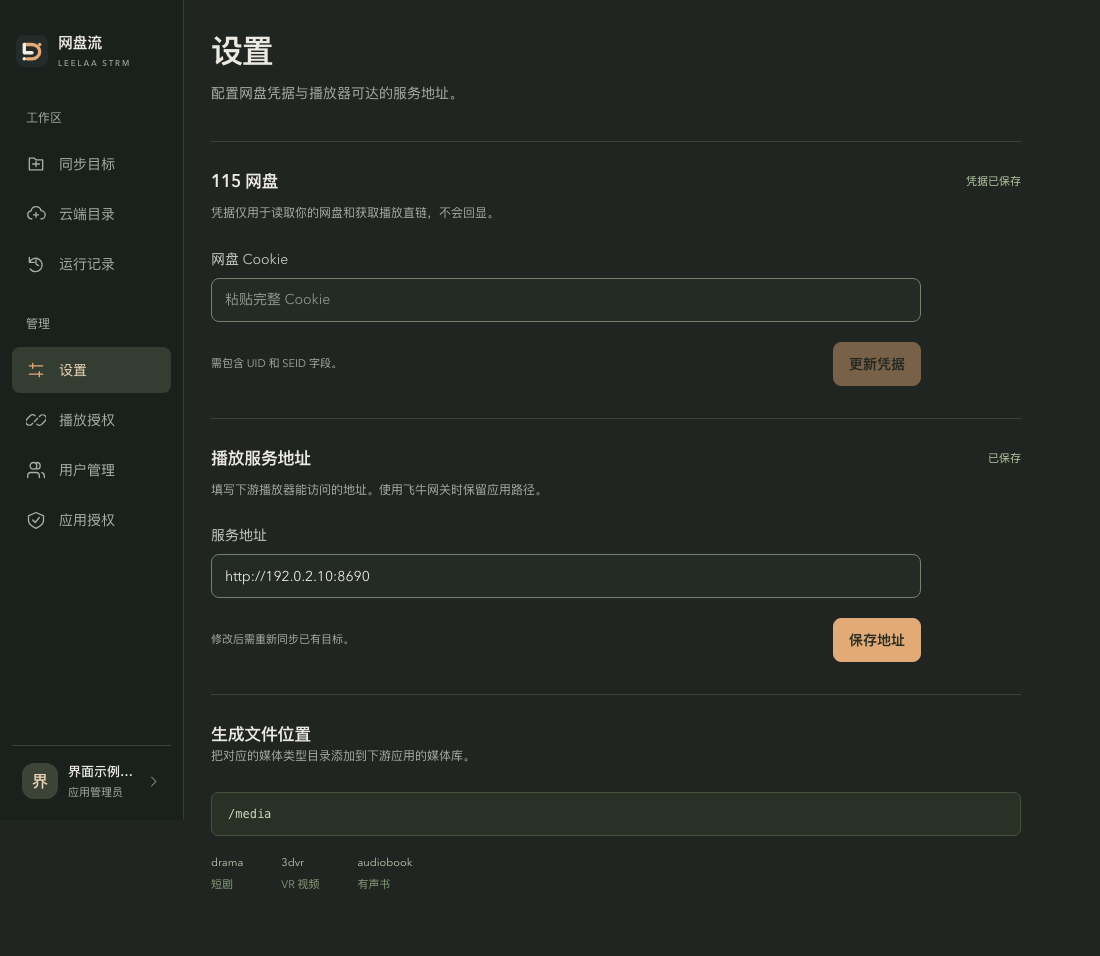
Interface example with sample data. Credentials are not echoed. After saving, read a real cloud directory; replace the example address with your deployment address. Controls are shown in Chinese.
The input hides and then clears its contents. Only configured status is returned, never the Cookie. Do not place credentials in screenshots, logs, tickets or chats. Missing UID/SEID, incomplete copies, newlines/control characters and duplicate fields can cause rejection.
Update credentials
Save a new Cookie on the same settings page without restarting; the button becomes 更新凭据 (Update credentials). Read a folder again and check downstream playback. STRM stores relay URLs, so a credential update usually needs no rewrite.
After expiry, update as instructed and read again before playing. If files, addresses, software license and playback grants remain valid, resync is normally unnecessary. Updating a Cookie does not resolve unrelated failures.
Browse directories
Under 云端目录:
- Enter a numeric CID under 目录 CID and click 打开目录 (Open folder), or use 打开我的网盘 to start at the root.
- Click a folder name to enter; breadcrumbs return to parent levels.
- Pages hold 50 items. Use 上一页 / 下一页 (Previous / Next); the current page is shown.
- Files show name and size. The size column identifies folders as 文件夹.
Browsing only lists the current level, matching sync's non-recursive range.
Select a work directory
Save 设置 → 播放服务地址 first. Otherwise 使用此目录 (Use this folder) is unavailable; see service address.
Inside the desired directory click 使用此目录. Its CID and folder name enter the new target form; edit the title if needed, choose the target application and create the sync.
Credentials and backup
Credentials are stored in local encrypted application data and never returned as a Cookie or complete direct link. Encryption does not isolate a person controlling the NAS. Preserve complete application state before upgrading/recovery; see data and privacy.
115 availability depends on account state and upstream limits. For persistent errors check credentials and the actual message, retry later, then use troubleshooting or contact the maintainer.