
English
Create and manage sync targets
Save the playback service address
In Settings → Playback service address(设置 → 播放服务地址), enter an address downstream players can reach, then click Save address(保存地址). The address is stored by the backend and survives refreshes and restarts.
Behind the fnOS gateway, keep the app prefix, for example (the port and prefix follow your actual deployment; copy them from the browser address bar):
text
https://your-nas-address:port/app/leelaa-strmNever enter 127.0.0.1, which only the NAS itself can reach. Enter the app entrance itself: HTTP or HTTPS only, without credentials, query parameters or any interface paths. When playback goes through the fnOS gateway, the player also needs a valid access identity; being able to open the admin page in a browser does not mean every standalone player inherits that session.
After changing the address, re-sync targets to update the relay address inside existing STRM files. Addresses already written to files never change automatically with the setting.
Create a target
- Obtain an available trial/software license under 应用授权, then save the 115 credentials and playback service address.
- Find the work directory in Cloud directory(云端目录) and click Use this directory(使用此目录), or enter a numeric CID in Sync targets → New target(同步目标 → 新建目标).
- Choose short drama, VR video or audiobook, and fill in the work title.
- Click Create and sync(创建并同步) and wait for the actual result. Ordinary members have no creation control.
- Check success/failure, file counts and notes in Run records(运行记录), then check the real generated directory under 设置 → 生成文件位置. Continue to downstream scanning and playback; written counts are not downstream indexing.
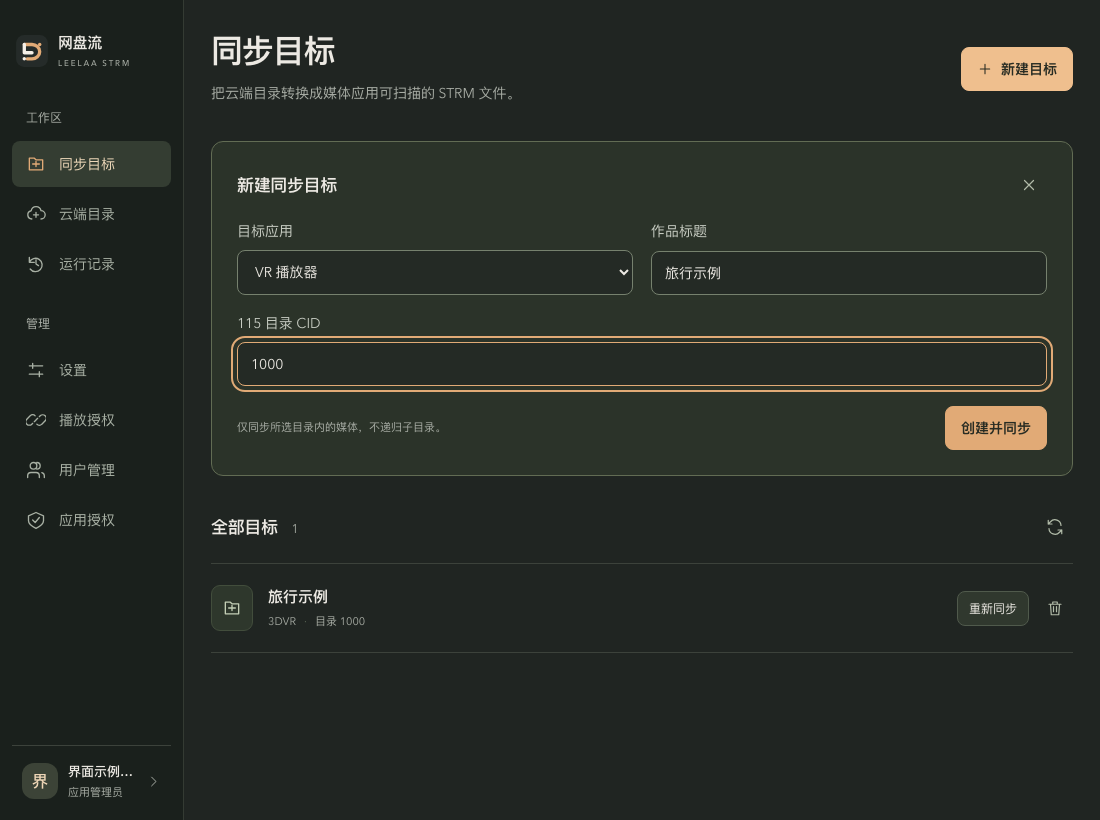
Interface example with sample data: choose the application, title and your own directory CID before creating and syncing. Do not copy the example CID. Controls are shown in Chinese.
Only matching media inside the current level of the chosen directory is processed, never recursively. Each sync processes at most 500 items at the current level (files and folders combined); exceeding the limit is rejected explicitly and nothing new is written. Split directories in the cloud drive first. Cloud browsing paginates 50 items per page; browsing pagination never lifts the sync limit.
Additional generation rules:
- Only media extensions are recognized — video: mp4, m4v, mov, ts, mkv, webm, flv, avi; audio (audiobooks): mp3, m4a, m4b, flac, wav, ogg, opus. Other files are ignored.
- Files are numbered by file name order: drama produces
drama/{title}/S01E01.strm…plustvshow.nfo; audiobook producesaudiobook/{title}/001_{chapter}.strm…; 3DVR produces3dvr/{title}/{video}.strm. Video names that differ only by case are rejected for 3DVR. - The title becomes a folder name and cannot contain
/,\,..or start with a dot, with a 200-byte limit (about 60 Chinese characters).
One target exists per type and title; creating again updates that target's CID and re-syncs. Do not submit repeatedly while a create or sync is running; after a request timeout, refresh targets and run records first and confirm whether the operation already completed.
Re-sync
When the cloud drive gains files, the service address changes or a directory must be regenerated, use Re-sync(重新同步) on the target row. A success count only means generated files were written; it does not mean downstream apps have scanned or played them.
Delete a target
Delete asks for confirmation. Deleting removes the generated files managed by this service and the target record; it never deletes original files in the 115 cloud drive. Back up first if you want to keep the output.
Reading/new-file-generation failures preserve old output. For errors reporting an already-switched output, backup cleanup failure or recovery marker, preserve and review state rather than assuming no files changed. Never wipe application data to hide failures.
Only one sync or delete runs at a time; while one is in progress, the UI reports that another operation is ongoing. Wait for a terminal status in run records before operating again.
Run records
The Run records(运行记录) page lists the most recent 50 syncs in reverse chronological order: target, status (success / failed / running / interrupted), files written (ok / total), time and the failure note. Each target row shows its latest run. Failed records keep the concrete reason; a running sync is marked interrupted after a service restart, and the output should be re-checked before syncing again. Records are for verification only — retries are issued from the target row.
Re-sync and interruptions
A re-sync generates a new directory first, then replaces the target's complete output, removing old generated files that are no longer in the list. If new files fail to generate, the original output is kept. Generation also records an exact list of the generated files. If manual files were added inside the target (including .strm), generated files were edited, or the record is missing, replacement and deletion are refused — back up and verify first. Different targets never clean each other, and legacy flat VR files are never auto-deleted.
After a service restart, an unfinished sync shows 「已中断」 (interrupted) and requires re-checking the output before syncing again. If .backup- backup or .sync- staging directories appear, stop the service and keep the scene; verify the current target, backups and recent records, then recover manually. Never empty the media directory directly. Unhandled backups block further syncs and deletes.
Directories created by older versions are not managed by the current version and are never claimed or auto-deleted after an upgrade. Stop the service, back up, move old directories out of the output root after verification, then start and re-sync the target.
When the cloud drive returns incomplete directory data, an explicit error is raised; the original output is kept and truncated results are never treated as a complete directory. Closing the browser, refreshing or a request timeout does not immediately cancel a background sync; check the real result in run records first. A running sync still blocks deletion and duplicate syncs.