
English
Playback authorization
Standalone players (devices or services that bypass the fnOS gateway and never sign in to this app) cannot use the normal relay address. Playback authorization(播放授权) provides a dedicated read-only channel for them: a revocable authorization key is issued per target and written into that target's STRM files, so the player needs no account at all to play the matching resources.
This differs from the software license under 应用授权 (Application license), which must remain valid. Player credentials cannot replace it. The feature is off by default. The channel binds only to the single NAS internal IP and port you enter, serves playback only — no management functions — and is not a general cloud-drive proxy.
Enable the dedicated playback channel
- Open Playback authorization(播放授权).
- Check 启用专用播放通道 (Enable dedicated playback channel) and enter the NAS internal IP and a free port, for example
192.168.1.10:8766. Only a single internal-network IP is allowed, and the port must be ≥ 1024. - Click 保存通道 (Save channel) and watch the status:
| Status | Meaning |
|---|---|
| 正在监听 … (Listening on …) | The channel is ready; authorizations can be created |
| 等待监听就绪 (Waiting for listener) | Just saved; wait a moment and click 刷新状态 (Refresh status) |
| 端口绑定失败 (Port bind failed) | The port is taken or the address is invalid; verify and retry. Management functions are unaffected |
| 外部播放未启用 (External playback disabled) | The channel is off; existing authorized addresses cannot play |
The dedicated channel is HTTP for a trusted internal network; never map this port to the public internet. Whether the NAS firewall allows it and whether a player can actually connect must be verified on real devices; saving the configuration does not prove network reachability.
The channel configuration persists with the app data; after a service restart the listener comes back automatically while the configuration stays enabled.
Create an authorization for a target
Prerequisites: the target has completed one sync, and the channel status is "listening".
- Pick the target under 目标播放授权 (Target playback authorization).
- Click 创建或轮换目标授权 (Create or rotate target authorization), review the warning and select 确认并更新 STRM (Confirm and update STRM). The files are rewritten and the old grant immediately revoked.
- The page temporarily shows 新授权密钥 · 仅本次显示 (New key, shown once). It is already written into STRM and need not be pasted into a player. Optionally copy it privately, then 隐藏并清除 (Hide and clear). Lists do not echo it, but STRM still contains the credential and must remain private.
- Rescan downstream and check real picture/sound, seeking and reopening. Saving a channel or seeing an authorized state alone does not establish playback.
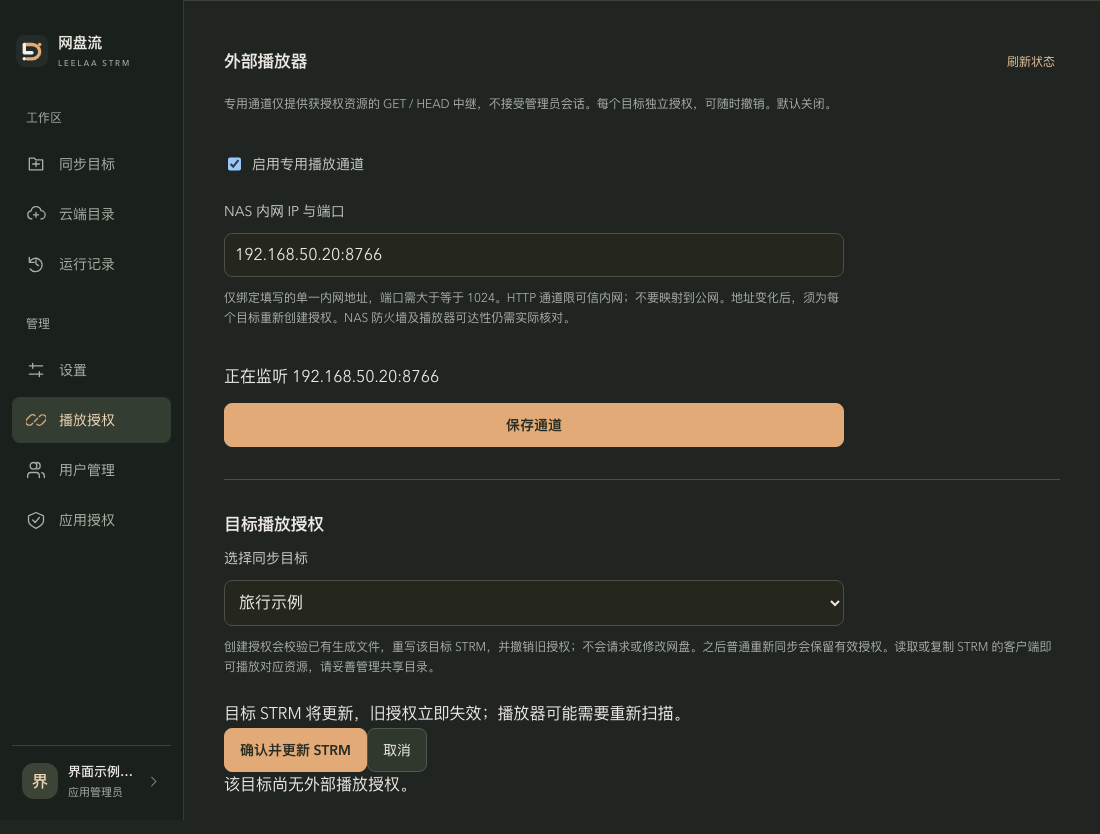
Interface example with sample data: check the target, confirm the STRM update, then rescan downstream. Listener state and addresses are examples; controls are shown in Chinese.
Creating an authorization verifies the exact manifest of the target's generated directory, rewrites all of that target's STRM files to dedicated addresses, and revokes the target's old authorization; the process never touches or modifies the 115 cloud drive. The operation is refused when the target directory contains manually added or modified files.
Whoever holds a STRM file holds the matching playback capability. Share the generated directories only with the downstream that needs them, and never publish STRM contents or keys.
Revoke and rotate
- Revoke(撤销): authorizations that are not revoked can be revoked from the list, immediately blocking further playback requests. CDN direct links already handed to a player remain valid until they expire; revocation cannot recall an ongoing stream.
- Rotate: creating an authorization again rewrites the target's STRM files and revokes the old one — use it when a key may have leaked or the address moved.
- Disabling/deleting the owning account or requiring a password reset, or deleting the target, invalidates its authorizations automatically.
Re-sync and address changes
- Normal re-sync: a target with a valid authorization reuses the same key when files are rewritten — no re-authorization needed. A sync that yields an empty result revokes the authorization.
- Channel disabled: targets with valid authorizations refuse automatic re-syncs; enable the channel or revoke the authorization first.
- IP or port change: old-address authorizations become invalid; create the authorization again per target to rewrite the files, then rescan downstream.
Common failures
| Symptom | Handling |
|---|---|
| The create-authorization button is unavailable | The channel is not enabled or not ready; finish Enable the dedicated playback channel first |
| Playback returns "播放资源不可用" (resource unavailable) | The authorization was revoked, the target deleted, or the address/key mismatch; create a new authorization |
| Playback returns "播放请求繁忙" (busy) | Too many concurrent requests; retry later |
| Playback still works briefly after revocation | 115 direct links already issued remain valid; expected behavior |
A .playback-pending file appears | The previous publication was interrupted. Do not retry automatically; verify the target output, backup and authorization state, then recover manually — see Troubleshooting |